
Every way your team sees work, in one Jira app.
Task Hub adds flexible boards, an editable list, a calendar, a timeline and summary dashboards to any Jira space, or across many. No new tool to learn, and your data never leaves Atlassian.
- Rated 5.0 on Atlassian Marketplace
- Runs on Atlassian
- Jira, JSM & business spaces
Many boards per space
Jira gives most spaces a single board. Give every team, stream or customer its own Task Hub.
Across spaces
Use a JQL query to pull work from any number of spaces into one view.
Five views, one setup
Configure once and switch between Board, List, Calendar, Timeline and Summary.
Nothing to host
Built on Forge, so it inherits Atlassian's security, residency and uptime.
Built for the way teams actually plan
Everything stays in sync with Jira. Change a card on the board and it changes everywhere.
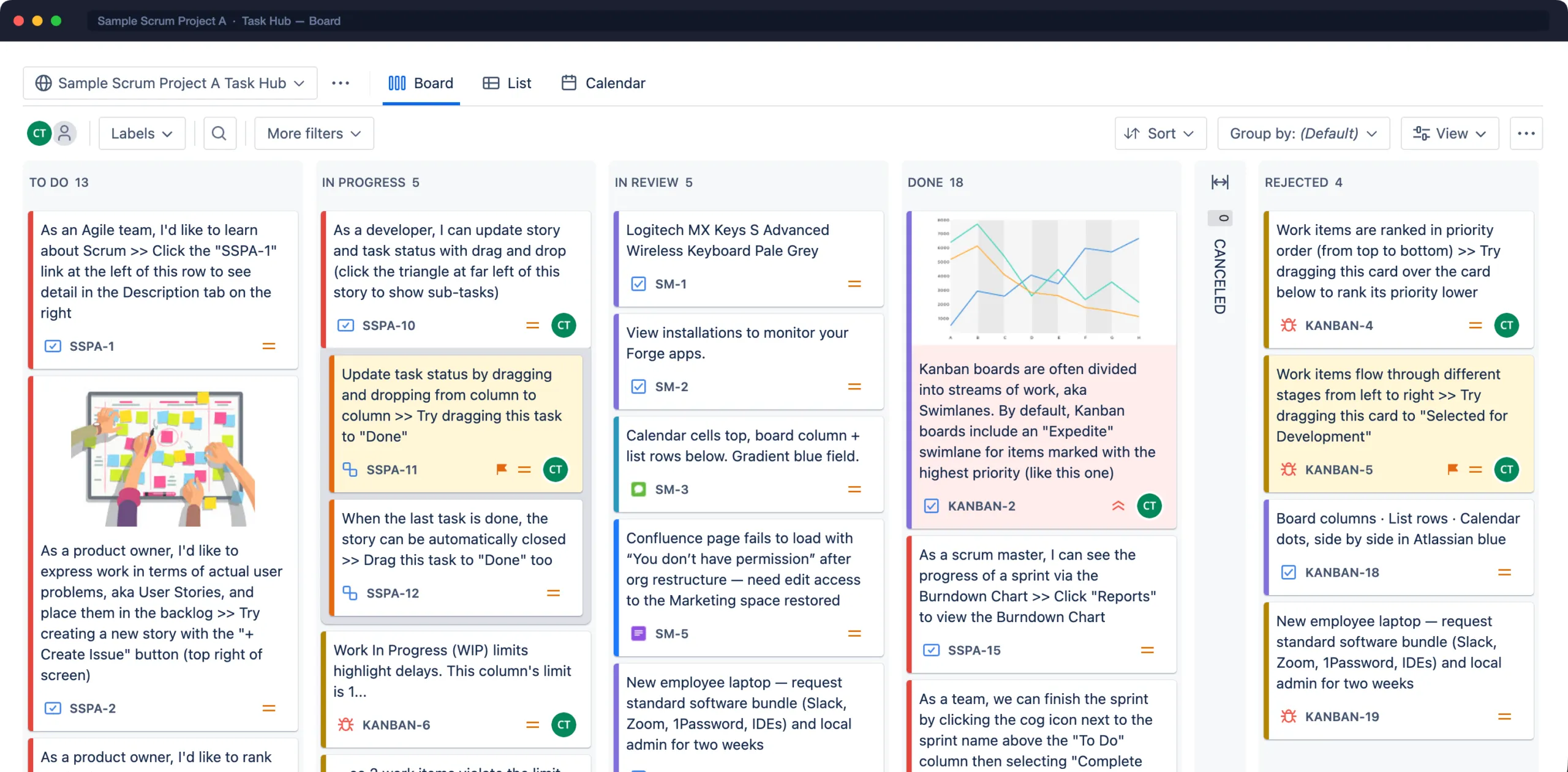
A board for every team, not one per space
Create as many Task Hubs as you need in any space, or pull work from several spaces into one. Each team gets the columns, swimlanes and cards that match how it works.
- Map any workflow statuses to columns, with min/max WIP limits
- Swimlanes by assignee, epic, priority, any field or custom JQL
- Card colors by JQL, priority or type, plus colored labels
- Drag to transition and rank, collapse columns, print cards
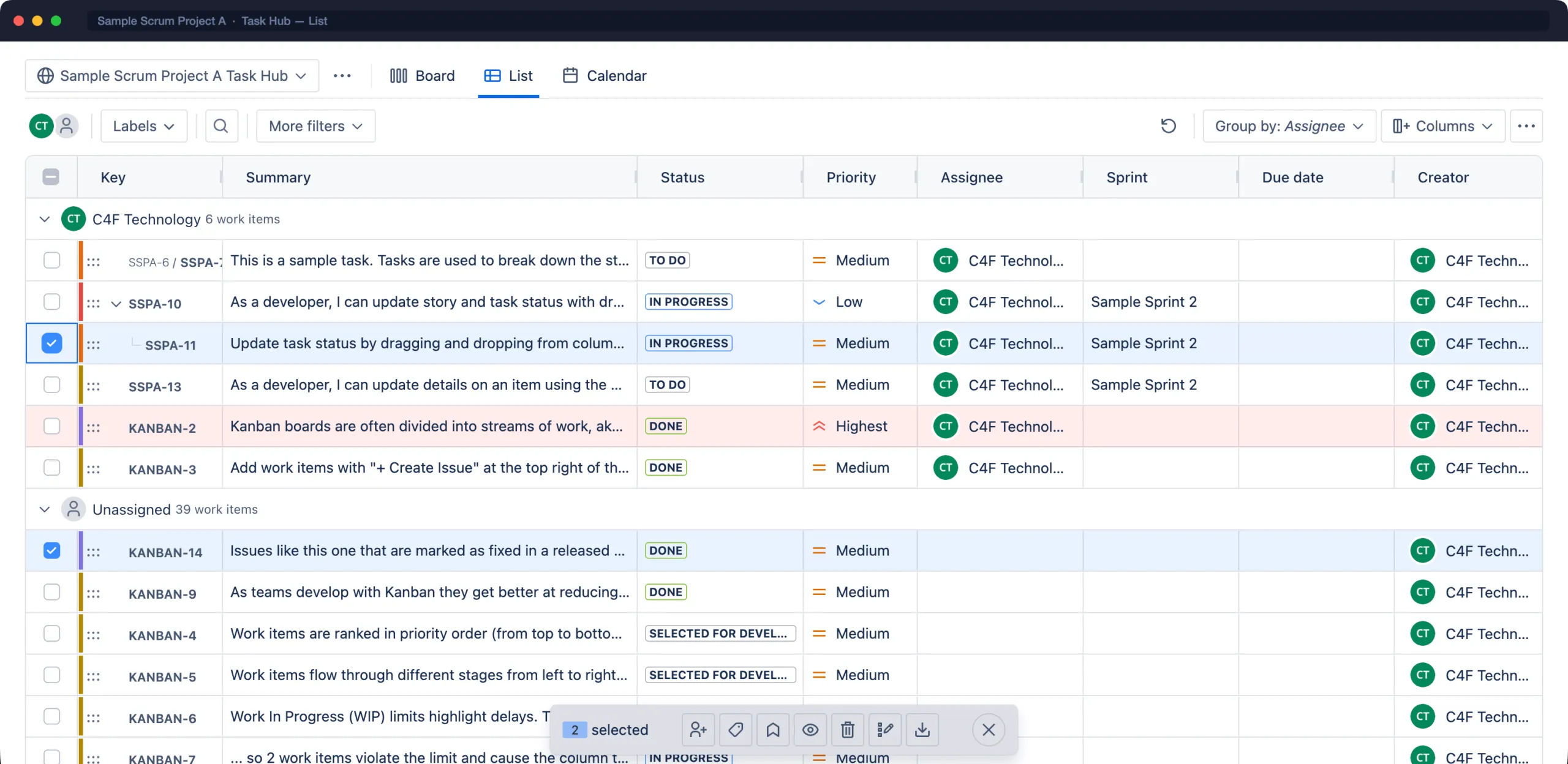
A fast, editable list for all your work
Sort, filter, group and edit work items right in the table, including description and comments, then change many at once.
- Inline editing of fields, status, assignee and labels
- Bulk assign, edit, label, prioritize, watch or delete
- Group by any field, choose and reorder columns
- One-click Excel export with summaries, worklogs and history
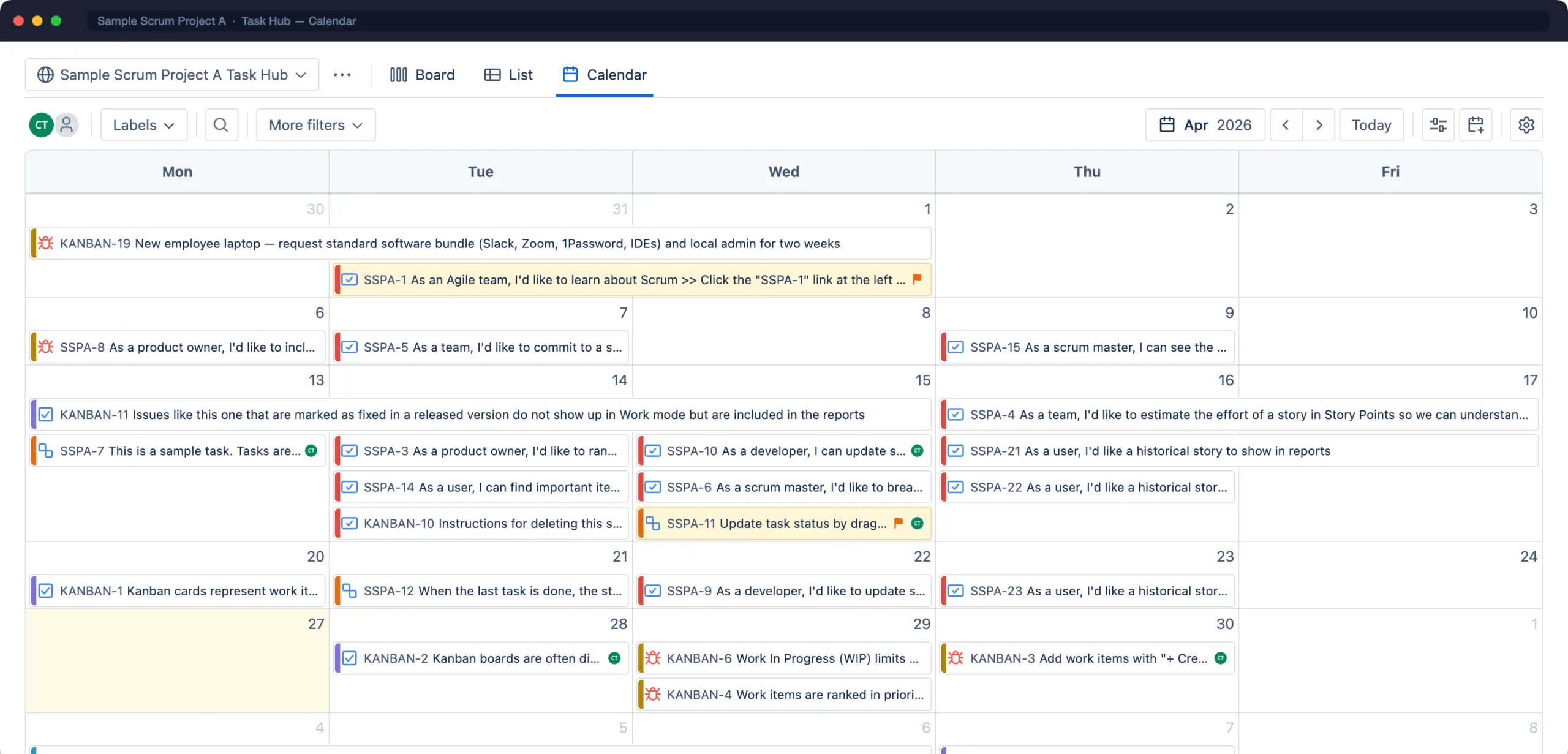
See what’s due, and plan what isn’t
Every work item lands on its date. Drag to reschedule, drop unscheduled work onto a day, and keep meetings, vacations and deadlines alongside your issues.
- Month, week, day, quarter and agenda views
- Releases and team events on the same calendar
- Overlay other Task Hubs to see dependencies across teams
- Export to Google Calendar, Outlook or .ics
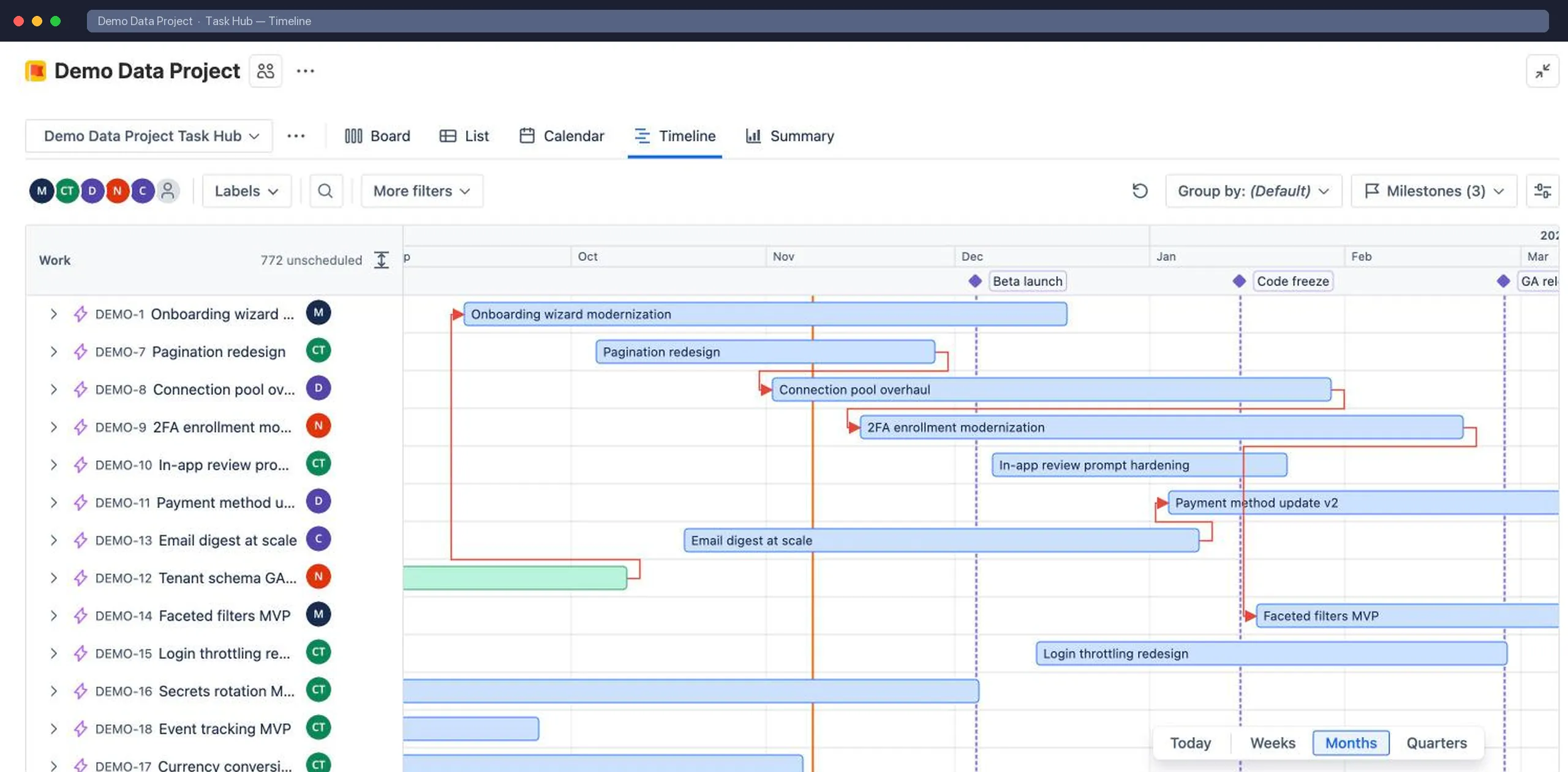
Plan the whole project on a timeline
See every work item as a bar between its start and due dates. Drag to reschedule, draw dependencies, and mark the dates that matter with milestones.
- Drag bars to change start and due dates
- Click an empty row to schedule undated work
- Dependency lines between linked work items
- Milestones, and zoom from weeks to quarters
From the team’s board to the leadership view
Excel export
Typed cells, grouping, totals, plus sheets for comments, worklogs, history and time in status.
Summary dashboards
Throughput, created vs resolved, work by status, assignee or epic, age and blocked work. Build your own layout.
Cross-space Task Hubs
One JQL query, any number of spaces. Ideal for programs, shared services and leadership views.
Dashboard gadget
Put a Task Hub’s calendar, timeline or summary on any Jira dashboard.
Access control
Public or private Task Hubs. Add members and administrators by user or group.
Works for JSM & business spaces
Bring boards to Jira Service Management and business spaces, grouped by request type.
Your data stays in Atlassian. Full stop.
Task Hub runs entirely on Atlassian Forge. There are no C4F servers, no external API calls and no tracking inside the app. Atlassian hosts and protects everything, the same way it protects Jira.
- Runs on AtlassianHosted on Forge with no data egress, so it qualifies for Atlassian's highest app trust signal.
- Data residencyApp data lives in Forge storage and follows your site's data residency settings.
- Jira permissions respectedUsers only see and edit work items their Jira permissions allow.
- Least privilegeScopes are limited to reading and updating work items and storing Task Hub settings.
Up and running in five minutes
- 1
Install from Marketplace
A Jira admin installs Task Hub in one click. Every space gets a Task Hub page in its sidebar.
- 2
Create a Task Hub
Name it and pick its scope: this space, or a JQL query across several spaces.
- 3
Shape it for your team
Map columns, add swimlanes, quick filters and card colors, then share it with the team.
Questions, answered
Which Jira products does Task Hub work with?
Task Hub works on Jira Cloud with software, business (work management) and Jira Service Management spaces, both company-managed and team-managed.
Does my data leave Atlassian?
No. Task Hub is built on Atlassian Forge and carries the “Runs on Atlassian” badge. It has no external servers. Work items stay in Jira, and Task Hub settings are stored in Forge storage inside your Atlassian site.
Will it change my existing Jira boards or workflows?
No. A Task Hub is a separate view over your work. It uses your existing workflows and fields and never changes Jira board or workflow configuration.
How is Task Hub priced?
Task Hub is billed through Atlassian with standard per-user Cloud pricing, and you can start with a free trial from the Atlassian Marketplace.
We use the Data Center version. Can we migrate?
Yes. Task Hub supports the Jira Cloud Migration Assistant, so your board configuration comes across when you migrate your spaces to Cloud.
More in the FAQ, or contact support.
Give every team the view it needs.
Start a free trial from the Atlassian Marketplace. Nothing to host or configure outside Jira.